 Sorimac
Superwhisper vs Wispr Flow vs MacWhisper: which Mac dictation app to pick
Short answer: Pick Wispr Flow if you want cloud dictation on every device and are fine paying $15 a month ($12 billed yearly). Pick Superwhisper if you want the same reach with offline local models and a choice of $8.49 a month, $84.99 a year or $249.99 once. Pick MacWhisper if you mostly transcribe recordings on your Mac and want to pay once (Pro €64). All three were checked on their official pages on October 8, 2026, and MacWhisper's price again on October 16.
Search "superwhisper vs wispr flow" and the autocomplete keeps going: vs MacWhisper, vs VoiceInk, vs Apple Dictation. Those three names come up together because they are the dictation apps most Mac users hear about first, and they look alike from a distance. Up close they make different bets. Wispr Flow bets on the cloud. Superwhisper bets on giving you every option. MacWhisper started from audio files and grew a dictation mode later.
This page puts the three side by side on the questions that usually decide it: price and billing, whether your voice leaves the Mac, live typing versus file transcription, platforms, and what the free version gives you. We checked every price and claim on each company's own page on October 8, 2026. If a page does not say something, we write "not listed" rather than guess.
A disclosure: we make Sorimac, a fourth Mac dictation app. It appears near the end as one more option, with its downsides. If you are leaving Wispr Flow and want a wider list, we cover eight apps in Wispr Flow alternatives for Mac.
How do the three compare at a glance?
| Wispr Flow | Superwhisper | MacWhisper | |
|---|---|---|---|
| Paid price | Pro $15/mo, or $12/mo billed yearly | Pro $8.49/mo, $84.99/yr, or $249.99 once | Pro €64 |
| Billing | Subscription only | Subscription or lifetime | One-time |
| Free version | 2,000 words/week on desktop, 1,000 on mobile | Free tier with unlimited Whisper models | Free version |
| Where speech is processed | Cloud, always | Local models or cloud models, your choice | On your device |
| Built around | Live dictation into any app | Live dictation into any app, plus files and meetings in Pro | Transcribing audio and video files, plus system-wide dictation |
| Platforms | Mac, Windows, iOS, Android | Mac, Windows, iOS, Android | Mac, iPhone, iPad |
| Refund | Not listed (cancel anytime) | 30 days, all plans | Pro: within 7 days if unhappy |
| Mac requirements | Not listed | Offline models run well only on Apple Silicon | More than 8GB RAM for Medium and Large models; minimum macOS not listed |
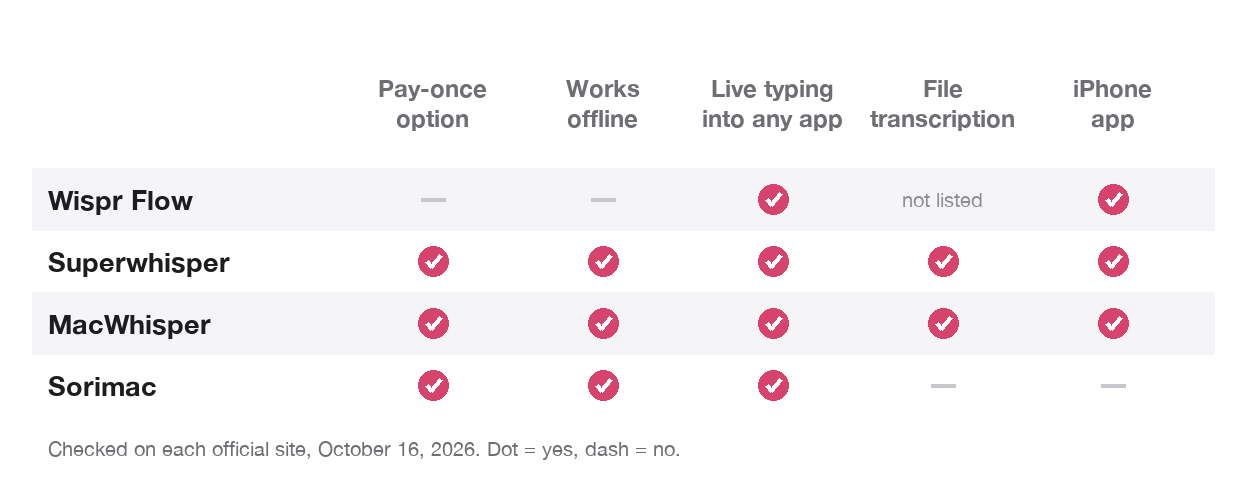
Sources, all checked October 8, 2026 (MacWhisper's price re-checked October 16, 2026 on macwhisper.com): wisprflow.ai/pricing, wisprflow.ai/privacy, superwhisper.com, MacWhisper on Gumroad. Prices change, so check the official page before you buy. MacWhisper's Gumroad page shows the price in your local currency.
How much does each one cost, and how do you pay?
Wispr Flow is subscription only. Pro is $15 per user per month, or $12 a month on a yearly plan. A Growth plan for teams adds SSO, HIPAA enforcement and admin controls at $23 a month ($18 yearly). Students and educators get 50% off Pro. There is no one-time option.
Superwhisper gives you three ways to pay for the same Pro plan: $8.49 a month, $84.99 a year (two months free), or $249.99 once. Students get 40% off. Every plan comes with a 30-day refund. New users get Pro features for their first 3,000 words before dropping to the free tier.
MacWhisper is a one-time purchase. Pro is €64 for one personal license on macwhisper.com (the Gumroad checkout showed €65 on October 16, 2026), and the developer offers a refund within 7 days if you are not happy.
Over two years, Wispr Flow on the yearly plan comes to $288, Superwhisper yearly to about $170, and MacWhisper Pro stays at €64. Superwhisper's lifetime plan pays for itself against its own yearly plan in about three years. If you dislike subscriptions, the choice is between MacWhisper and Superwhisper lifetime.
Which ones work offline and keep your voice on the Mac?
This is where the three differ most.
Wispr Flow says it directly on its privacy page: "Transcription always happens in the cloud to provide the best speed and accuracy." We found no mention of an offline mode on its site. If your work cannot go to a third-party server, Wispr Flow is out, by its own description.
Superwhisper runs both ways. Its free tier includes unlimited use of local Whisper models, and Pro adds cloud and local AI models plus your own AI API keys. Its FAQ adds a hardware note: "Offline models only run really well on Apple Silicon macs," and Intel Macs do better with cloud models. So Superwhisper can keep audio on your Mac, but only if you pick local models and leave the cloud features off.
MacWhisper says: "All transcription is done on your device, no data leaves your machine." It also connects to outside services if you add them, such as a DeepL key for translation or cloud providers like ElevenLabs and Deepgram for speaker recognition. Those are opt-in. Left alone, it stays local.
Live dictation or file transcription: what is each app built for?
People often compare these three as if they were the same kind of tool. They are not quite.
Wispr Flow is a live dictation tool. You hold a key, speak, and polished text lands in whatever app you are in. Its Notetaker feature records meetings on Mac and Windows. We found no audio-file transcription on its pricing page.
Superwhisper is also live dictation first, with modes that reshape what you said for email, chat or notes. Its free tier includes meeting recording and transcription. Pro adds "Transcribe audio and video files" and translation into English.
MacWhisper comes from the other direction. Its page leads with file work: drag and drop audio files, batch transcription, an editor for fixing transcripts, subtitle export, speaker recognition, and search across all your transcripts. Dictation is on the list too, as "System wide dictation with Whisper to replace Apple's own dictation," with automatic punctuation and grammar cleanup if you set up an AI service.
A rough rule: if most of your speech-to-text is talking into a text box, start with Wispr Flow or Superwhisper. If most of it is recordings, such as interviews, lectures or podcasts, start with MacWhisper.
Which devices does each one run on?
Wispr Flow: Mac, Windows, iOS and Android on every plan.
Superwhisper: Mac, Windows, iOS and Android.
MacWhisper: Mac, and now iPhone and iPad as well, according to its Gumroad page. There is no Windows or Android version listed.
If you switch between a Mac and a Windows PC, or carry an Android phone, MacWhisper drops out and the choice is between the other two.
What do you get for free?
Wispr Flow Free gives you 2,000 words a week on desktop and 1,000 a week on mobile, with limited Notetaker use. That is enough to judge the quality, not enough for daily heavy use.
Superwhisper Free includes voice to text in any app, meeting recording and transcription, 100+ languages and unlimited use of Whisper models. It is the most usable free tier of the three if you only need local dictation.
MacWhisper Free is a working app for Whisper transcription. Its page says some Whisper models are only fully available to Pro users. The Gumroad page does not spell out every line between Free and Pro, so check the feature list before you buy.
Which one should you pick?
You want dictation on Mac, Windows and phone, and the cloud is fine. Wispr Flow is built for that. Superwhisper covers the same four platforms and costs less per month.
Your voice must stay on your Mac. Superwhisper with local models only, or MacWhisper. Wispr Flow does not offer this.
You hate subscriptions. MacWhisper Pro (€64 once) or Superwhisper lifetime ($249.99).
You mostly transcribe recordings. MacWhisper. Superwhisper Pro also does files, but MacWhisper's editor, batch mode and subtitle export are the center of the product.
You want to tune everything. Superwhisper, with its custom modes, prompt control, own API keys and a choice of local and cloud models.
You are on an Intel Mac. Superwhisper itself recommends cloud models there, and MacWhisper says performance on older Intel Macs "can also be bad." Wispr Flow, being cloud-only, may be the practical pick.
You want to pay as little as possible. Superwhisper's free tier, or Apple Dictation, which is already on your Mac. Our list of Wispr Flow alternatives also covers free open source apps such as Handy.
Is there a fourth option?
Yes, and since it is ours, weigh this section with that in mind. Sorimac is a menu bar app for live dictation on the Mac. Speech recognition runs on your Mac with on-device Whisper and Qwen3-ASR models, so your audio does not go to a server. It goes online only to download models, check for updates and activate the license.
It costs $9.99 once for one Mac, with a 3-day free trial. On our test Mac, the median time from starting to speak to the first typed character was 1.33 seconds with the Qwen3 model, measured in late September 2026. That is one machine; yours will differ.
What it does not do matters as much:
- Mac only. No iPhone, iPad, Windows or Android app.
- Apple Silicon and macOS 15 or later. No Intel Macs, no older macOS.
- Live dictation only. It does not transcribe audio or video files, so it is not a MacWhisper replacement.
- One Mac per license. Use the 3-day trial on your real work before you pay; a full refund is available within 14 days.
If you want offline live dictation on a single Apple Silicon Mac and do not need files or a phone app, it is the lowest one-time price here. Details are on the Sorimac vs Wispr Flow page and in the FAQ.
How should you test them before you pay?
All three have a free version, and Superwhisper adds a 30-day refund. Use that time on your real work instead of a sample sentence. Dictate a message with your colleagues' names, a term from your field and a long paragraph. If you transcribe recordings, feed each app the same 10-minute file. Then compare three things: how long you wait for text, how many words you have to fix, and whether it types into the apps you use every day. Those answers will tell you more than any comparison table, ours included.
FAQ
Is Superwhisper better than Wispr Flow?
It depends on what you need. Superwhisper is cheaper per month ($8.49 vs $15), offers a $249.99 lifetime plan and can run offline with local models. Wispr Flow always transcribes in the cloud and is subscription only. Both run on Mac, Windows, iOS and Android. Prices checked October 8, 2026.
Is MacWhisper the same kind of app as Superwhisper?
Not quite. MacWhisper is built mainly for transcribing audio and video files on your Mac, with system-wide dictation as one feature. Superwhisper is built mainly for live dictation into any app, with file transcription in its Pro plan.
Which of the three works offline?
MacWhisper transcribes on your device. Superwhisper works offline when you use its local models, which run best on Apple Silicon. Wispr Flow says transcription always happens in the cloud.
Which one can you buy once instead of subscribing?
MacWhisper Pro is a one-time €64 license, and Superwhisper sells a $249.99 lifetime plan. Wispr Flow has no one-time option.
Does MacWhisper have an iPhone app?
Yes. Its Gumroad page, checked October 8, 2026, says MacWhisper is now also available on iPhone and iPad. It lists no Windows or Android version.