 Sorimac
Mac dictation vs Wispr Flow: is built-in good enough?
Short answer: For short messages and notes, Apple's built-in Mac dictation is often good enough. It is free, has no length limit, adds punctuation automatically in supported languages, and on Apple silicon can process general dictation on the device. Wispr Flow costs $15 a month ($12 billed yearly, free plan 2,000 words a week on desktop), always transcribes in the cloud, and adds a personal dictionary, snippets and apps for Windows, iOS and Android. Both were checked on official pages on October 15, 2026.
Before you pay $15 a month for Wispr Flow, it is fair to ask whether the dictation already built into your Mac would do. It costs nothing, it is one key press away, and on newer Macs it can run without sending your voice anywhere. The honest answer is that for a lot of people it is enough, and for some it clearly is not.
This post sticks to what each company says on its own pages. Every fact about Apple's dictation comes from Apple's Mac User Guide, and every fact about Wispr Flow from wisprflow.ai, all checked on October 15, 2026. Where a page does not say something, we write "not listed" instead of guessing.
A disclosure: we make Sorimac, a paid Mac dictation app that appears near the end as a middle option. We have tried to keep that section as plain as the rest, limits included. If you want the wider field, our list of Wispr Flow alternatives for Mac covers eight apps, and our Superwhisper vs Wispr Flow vs MacWhisper comparison goes deeper on the paid apps.
How do Mac dictation and Wispr Flow compare?
| Apple Dictation (built in) | Wispr Flow | |
|---|---|---|
| Price | Free, part of macOS | Free plan; Pro $15/mo, or $12/mo billed yearly |
| Free limit | No word limit listed | 2,000 words a week on desktop, 1,000 on mobile |
| Where speech is processed | On Apple silicon, general dictation can be on the device (check Keyboard settings) | "Transcription always happens in the cloud" |
| Length limit | None; stops after 30 seconds of silence | Pro: unlimited dictations |
| Automatic punctuation | Yes, in supported languages | Not listed on the pricing page |
| Languages | Varies by language and region | 100+ languages |
| Custom dictionary | Not listed | Yes, plus snippets |
| Platforms | Mac, iPhone, iPad | Mac, Windows, iOS, Android |
Sources, checked October 15, 2026: Apple: Dictate messages and documents on Mac, Apple: Commands for dictating text on Mac, wisprflow.ai/pricing, wisprflow.ai/privacy.
How do you use dictation on a Mac?
Turn it on first. Apple's guide says to choose Apple menu > System Settings, click Keyboard in the sidebar, go to Dictation and turn it on. When you enable it, macOS asks whether to share audio recordings to improve Siri and Dictation. You can click Not Now, and change the choice later under Privacy & Security > Analytics & Improvements.
Then, to dictate:
- Put the cursor where you want the text.
- Press the Microphone key if your keyboard has one, use the Dictation keyboard shortcut, or choose Edit > Start Dictation.
- Speak when the cursor pulses or you hear the tone.
- Stop with the Escape key, the Microphone key or the shortcut again.
A short press of the Microphone key starts dictation; holding it down calls Siri instead. You can change the shortcut in Keyboard settings. Apple's examples include pressing the Fn (Function) key twice, or a custom combination such as Option-Z.
Is Mac dictation private, and does it work offline?
This is where built-in dictation is stronger than many people expect. Apple's guide says you can check Keyboard settings to see whether your voice input and transcripts for general text dictation "are processed on your device and not sent to Siri servers." The wording is careful. It covers general dictation such as messages and notes, and Apple says it does not cover dictating into a search box. Look at the text under Dictation in Keyboard settings on your own Mac rather than assuming.
Wispr Flow is direct about the opposite design. Its privacy page says: "Transcription always happens in the cloud to provide the best speed and accuracy." It adds that your audio is deleted as soon as it is transcribed, unless you turn on Dictation cloud storage. Its site does not list an offline mode.
If your work involves client notes, health details or code you should not send out, that difference may settle the question before price comes up.
What are the limitations of Mac dictation?
Apple's own pages point out several, and they are the usual reasons people go looking for an app.
It stops when you pause. You can dictate text of any length with no timeout, but dictation "stops automatically when no speech is detected for 30 seconds." If you think in long pauses, you will be pressing the key again.
Languages vary. Apple says dictation "is not available in all languages or regions, and features may vary," and points to its macOS Feature Availability page. You can set up several languages and switch between them, but you do the switching.
The commands are for formatting, not editing. Apple's command list covers punctuation ("question mark", "open parenthesis"), formatting ("new line", "new paragraph", "tab key", "no space on"), capitalization ("caps on", "all caps"), symbols, currency and a few emoticons. Commands to select or delete text are not on that list. Full voice control of the Mac is a separate feature, Voice Control, and Apple notes that when Voice Control is on, standard macOS dictation is not available.
No custom vocabulary is listed. Neither Apple page mentions adding your own words, names or jargon. When dictation is unsure, it underlines the ambiguous word in blue, and you click it to pick an alternative. That helps, but it is a correction after the fact, not a way to teach it your team's product names.
No text cleanup is listed. Apple adds commas, periods and question marks in supported languages. Nothing on these pages says it removes filler words or rewrites sentences.
There are also two quieter strengths worth knowing. On an Apple silicon Mac you can keep typing while dictation is on, without stopping it. And dictation works "anywhere you can type," in Apple's words, so it is not limited to Apple's own apps.
What does Wispr Flow add for the money?
From its pricing page on October 15, 2026, the free plan includes speech-to-text in 100+ languages, a dictionary and snippets, with 2,000 words a week on desktop and 1,000 on mobile. Pro, at $15 per user per month or $12 billed yearly, removes the word cap and adds things aimed at teams: a shared dictionary and snippets, a team workspace, centralized billing and usage analytics. A Growth plan at $23 a month ($18 yearly) adds SSO and HIPAA enforcement with a BAA.
The other thing it adds is reach. Wispr Flow runs on Mac, Windows, iOS and Android, so the same dictionary follows you to a Windows work laptop or an Android phone. Apple's dictation covers Mac, iPhone and iPad, and nothing else.
What we can not tell you from official pages is how the two compare on accuracy for your voice. Neither company publishes a figure we could set side by side, so we have left accuracy out of the table. The free tiers make it cheap to find out yourself.
Is built-in dictation good enough for you?
Built-in is probably enough if:
- you dictate short messages, emails and notes;
- you stay inside Apple devices;
- you want general dictation processed on your Mac, and the Keyboard settings text confirms it;
- you can live with re-pressing the key after long pauses, and with fixing names by hand.
Wispr Flow is a better fit if:
- you also work on Windows or Android;
- you need a dictionary of names and terms, or snippets you trigger by voice;
- you are buying for a team and want shared vocabulary, central billing or SSO;
- you are comfortable with cloud transcription and a monthly bill.
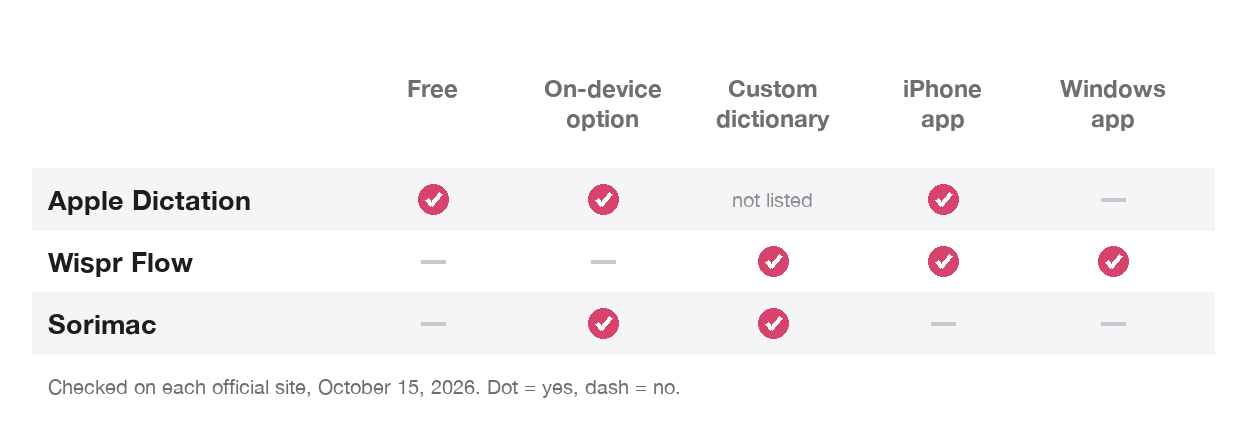
You may want something in between if built-in dictation falls short but you do not want a subscription or the cloud. That is the space where one-time, offline apps sit: VoiceInk, MacWhisper Pro, Superwhisper's lifetime plan, Handy (free), and our own app. The alternatives list has prices for all of them.
Where does Sorimac fit?
Sorimac is our app, so weigh this section accordingly. It is a menu bar dictation app for Mac that runs speech recognition on the Mac itself with Whisper and Qwen3-ASR models, so your audio is not sent to a server. It goes online only to download models, check for updates and activate the license. It supports a custom word list for names and terms, which is the main gap we see in the built-in option, and it costs $9.99 once.
On our test Mac, the median time from starting to speak to the first typed character was 1.33 seconds with the Qwen3 model, measured in late September 2026. That is one Mac, and yours will differ.
What it does not do:
- Mac only. No iPhone, iPad, Windows or Android app. Wispr Flow and Apple both cover more devices.
- Apple Silicon and macOS 15 or later. Intel Macs are not supported.
- One Mac per license. There is a 3-day free trial and a 14-day full refund, so test it on your real writing before you pay.
- No team features. No shared dictionary, admin tools or SSO.
If built-in dictation already does the job for you, keep using it. There is no reason to pay for any of these apps just because they exist. The Sorimac vs Wispr Flow page has more detail if you are weighing the paid options.
How to decide in one afternoon
Try Apple's dictation first, since it is already on your Mac. Open Keyboard settings, read the line under Dictation about where your voice is processed, and dictate something real: a message with your colleagues' names, a paragraph with a term from your field, and a long note with a pause in the middle. Count the words you have to fix.
If that goes fine, you are done and it cost nothing. If names and jargon keep coming out wrong, or the pauses keep stopping you, try Wispr Flow's free plan and one offline app's trial on the same text, and compare how many fixes each one needs.
FAQ
Is Mac dictation as good as Wispr Flow?
It depends on what you need. Apple's built-in dictation is free, has no length limit and can process general dictation on Apple silicon Macs. Wispr Flow adds a custom dictionary, snippets, team features and apps for Windows and Android, and transcribes in the cloud. Neither publishes an accuracy figure we could compare.
Does Mac dictation work offline?
Apple says that on supported Macs you can check Keyboard settings to see whether general text dictation is processed on your device and not sent to Siri servers. Dictating in a search box is excluded. Check the text under Dictation on your own Mac.
Is there a time limit on Mac dictation?
No. Apple says you can dictate text of any length without a timeout, but dictation stops automatically when no speech is detected for 30 seconds.
How much does Wispr Flow cost?
On October 15, 2026, Wispr Flow Pro was $15 per user per month, or $12 a month billed yearly. The free plan allows 2,000 words a week on desktop and 1,000 on mobile.
Can you edit text by voice with Mac dictation?
Apple's dictation commands cover punctuation, line breaks, capitalization and symbols. Commands for selecting or deleting text are not in that list. For full voice editing Apple offers Voice Control, which replaces standard dictation while it is on.
Can Mac dictation learn custom words?
Apple's dictation pages do not list a custom vocabulary. When a word is ambiguous it is underlined in blue so you can pick an alternative. Wispr Flow, and several third-party Mac apps including Sorimac, offer a custom dictionary.